In case of communication errors between the tool and the ECU, it's extremely important to perform some simple preliminary tests. This will avoid useless delays in the comprehension of the problem occurred.
If, after the tests, the tool still shows the same communication error during the ID - READING - WRITING procedures, you have to send some LOG files to your Master. The LOG files can be considered a report of what happened between the tool and the ECU.
To send the LOG files, connect the tool to its power supply and to the PC.
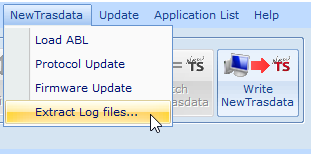
1. Open Flash Point Client software and then, depending on the tool, click on the proper menu: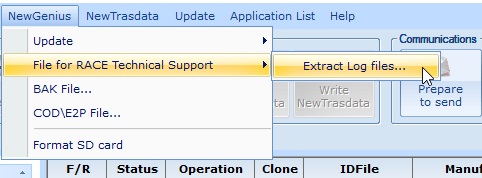
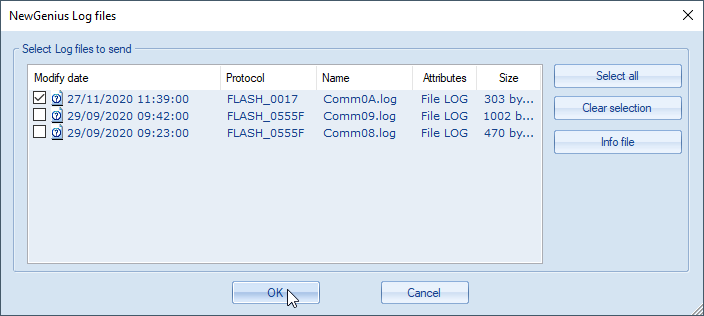
2. Flash Point Client software will display all the LOG files saved in the tool. The files are organized according to DATE and PROTOCOL/PLUGIN, select only the files concerning the vehicle on which the problem arose.
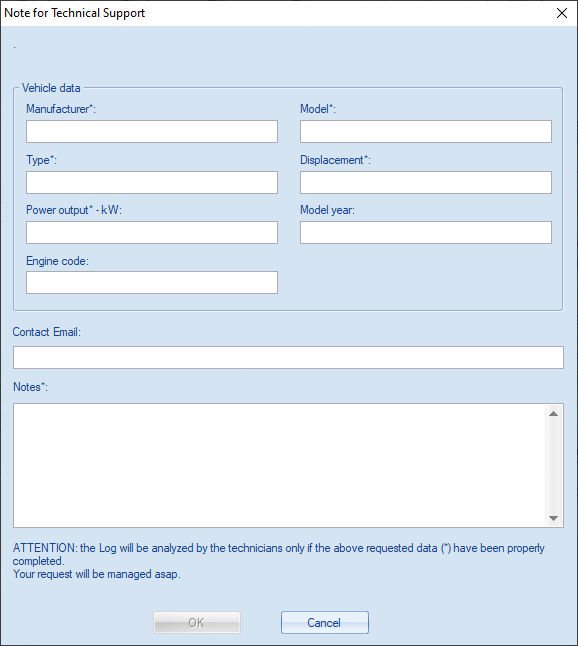
 3. After the selection of the LOG files to send, you MUST input all the mandatory information/data about the vehicle, your email and add some useful notes to understand the problem.
 4. The LOG files sent will be analysed by your Master in order to fix the communication problem found, then a feedback message will be provided in order to allow you to complete the tuning procedure and operations.
Was this article helpful?
That’s Great!
Thank you for your feedback
Sorry! We couldn't be helpful
Thank you for your feedback
Feedback sent
We appreciate your effort and will try to fix the article