After flashing a modified file, the following dashboard message may appear:
"Cleaning Exhaust Filter – Must Continue Driving"
or similar messages such as:
"Exhaust Clean" / "Service Exhaust System"
Example Message
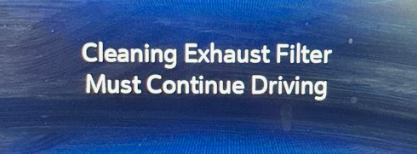
This is NOT a file issue
The message appears because adaptation and service values inside the ECU were not properly reset.
MANDATORY PROCEDURE AFTER FLASHING
BEFORE connecting the diagnostic tool:
- Switch ignition OFF
- Press and hold ignition button / key in ON position for 10 seconds
- Only then connect your Snap-On, Autel, or OEM diagnostic tool
NOTE: If this step is skipped, the tool may show the reset as completed, but the values are not actually cleared.
Perform the following resets using the diagnostic tool:
- DPF Reset
- Clear DPF Learned Values
- Exhaust System Reset (if available)
- Clear ALL Fault Codes
- Clear ALL Modules
After completing the resets:
- Switch ignition OFF
- Wait 30–60 seconds
- Start the engine
- Verify the exhaust message is no longer displayed
IMPORTANT
If the proper reset procedure is NOT performed, the exhaust message may remain active.
Repeated OBD flashing will NOT correct this issue.
The message is caused by adaptation and service values that were not cleared after programming and must be reset using a compatible diagnostic tool.
Recommended Tools
- OEM GM Diagnostic Software (GDS2)
- Autel Diagnostic Tools
- Snap-On Diagnostic Tools
- Equivalent professional scan tools capable of DPF service functions
Technical Note:
This condition is not caused by the calibration itself. In nearly all cases, performing the required DPF and adaptation resets resolves the issue without the need to reflash the ECM.
E66 LZ0 or any ECU with hard codes (customer drove in derate for a long time) must unhook batteries for 10min after flashing or dash will not clear.
Was this article helpful?
That’s Great!
Thank you for your feedback
Sorry! We couldn't be helpful
Thank you for your feedback
Feedback sent
We appreciate your effort and will try to fix the article